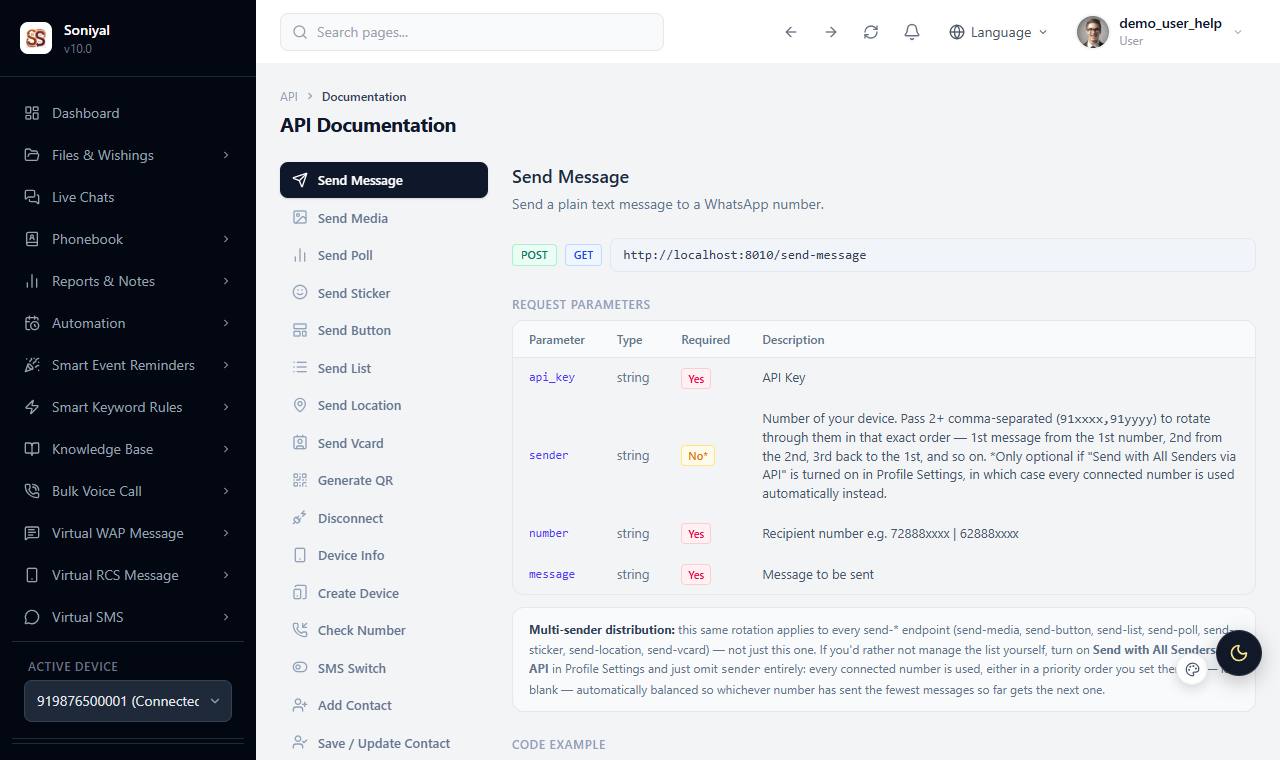
Use your API key to send text, media and more from websites, CRMs and apps.
Business tools1 min readUpdated:
The API Docs page lists every endpoint with request examples in several languages. Your API key is on the Settings page. With it your own systems can send messages, check numbers, manage devices and more.
When to use it
OTPs from your app, order updates from your shop, CRM automations.
Example
A web shop calls the send-message endpoint right after payment so the customer gets the order confirmation instantly.
Pro tips
Keep the API key on your server, never in public JavaScript.
Enable “Fix Number Rule” so numbers are cleaned automatically.
Step by step
Get your key
Open Settings and copy your API key.
Open API Docs
Click API Docs in the left menu and pick the endpoint you need.
Copy a sample
Choose your language (cURL, PHP, JavaScript, Python …) and copy the code.
Replace the values
Put in your key, sender number and receiver.
Test
Run the request and read the JSON response.
Frequently asked questions
Is there a rate limit?
Sensible limits apply; spread large sends over time.
Can I send from several numbers?
Yes, use the all-senders option or pass several senders.