Virtual WAP, RCS and SMS: submit a campaign for the team to send
Paste numbers and a message, pay from your wallet and track the report — the team sends it for you.
Voice & SMS2 min readUpdated:
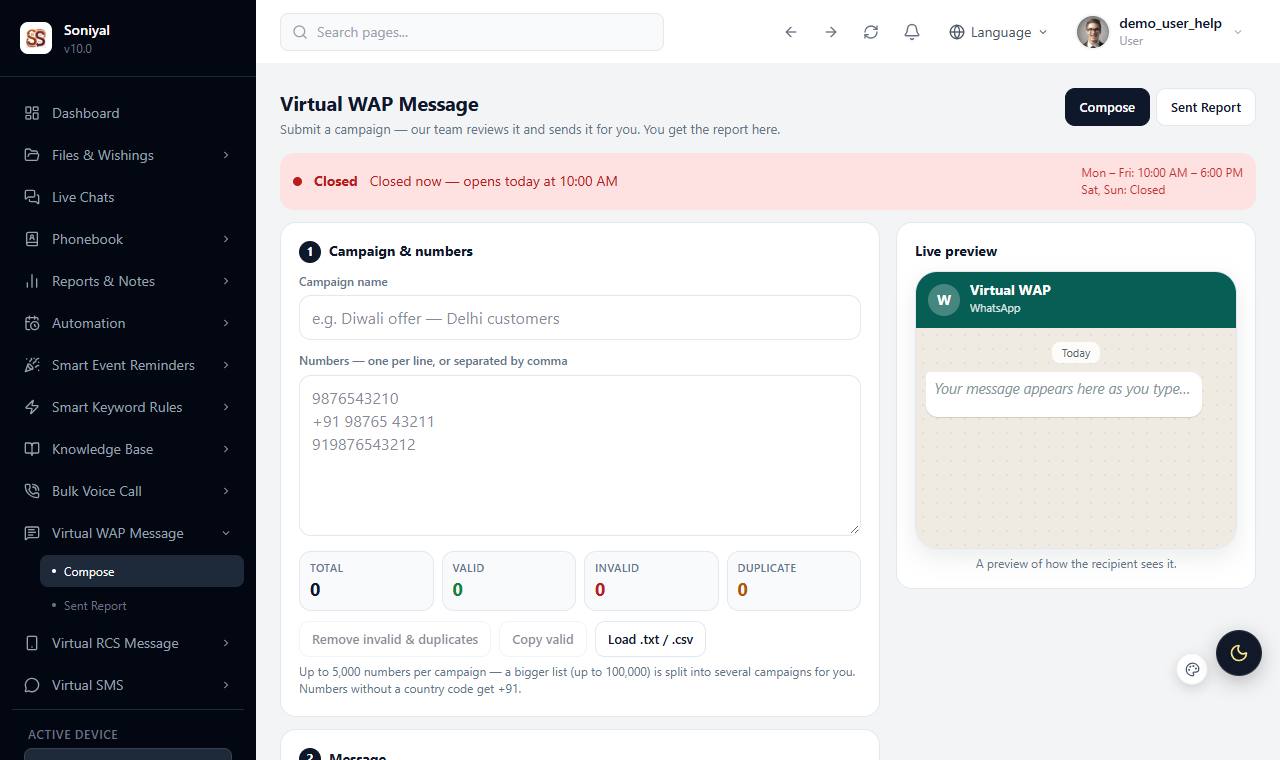
Virtual WAP Message, Virtual RCS Message and Virtual SMS are three modules with the same flow: you submit numbers and a message on the Compose page, our team (or an API) sends it, and you see the status and report on the Sent Report page. SMS shows a live character and part counter.
When to use it
When you want campaigns delivered without connecting your own number, or you need RCS / SMS channels.
Example
Minimum is 2,000 numbers, but a demo allows 5 numbers twice a day: Arjun tests with 5 numbers first and later submits his real 3,500-number list.
Pro tips
A 161-character SMS is 2 parts and costs double; shorten it to stay in one part.
You can cancel while the campaign is still pending and get your money back.
Rejected or failed campaigns are refunded automatically.
Step by step
Open Compose
Choose Virtual WAP, RCS or SMS in the left menu, then Compose.
Add numbers
Paste or load a .txt / .csv; invalid and duplicate numbers are removed and counted live.
Write the message
Add text, an optional media link and Visit / Call buttons (WAP and RCS). For SMS watch the part counter and pick a sender ID if asked.
Check the rules
The page shows the allowed hours, the minimum numbers per campaign and any demo allowance.
Accept and submit
Accept the terms, then Submit now or Schedule later inside the allowed hours; the cost is taken from your wallet.
Follow the report
Open Sent Report to see Submitted, Approved, Completed, the response and the downloadable report.
Frequently asked questions
Why was I refused with “at least N numbers”?
Your account has a minimum list size; use a demo (if enabled) or add more numbers.
How many numbers can I send at once?
The page shows the limit; bigger lists are split into several campaigns for you.