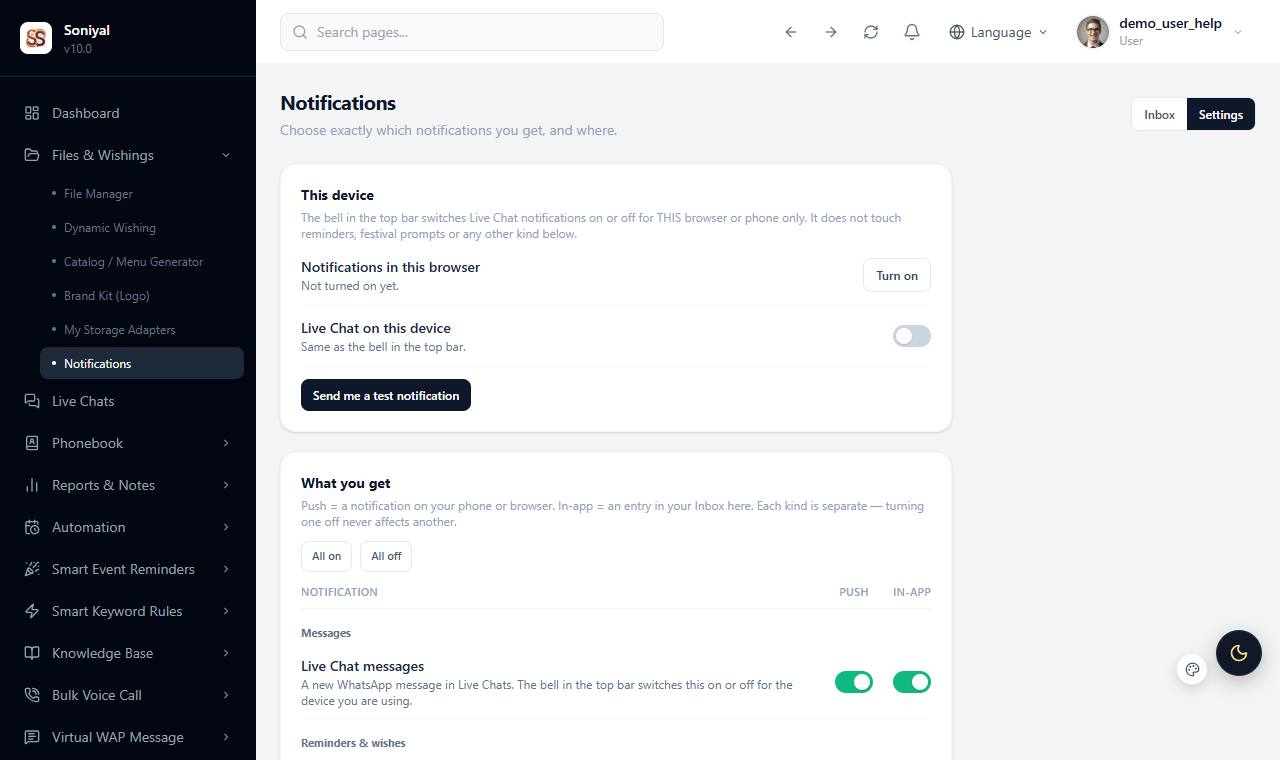
Notifications: bell, Inbox aur har kind ki alag settings
Tay karein kaun-si notification milegi: bell se sirf Live Chat, baaki sab Notification settings me alag-alag.
Shuruaat karein2 min me padheinUpdate:
Upar ki bell sirf us device par Live Chat notifications chalu/band karti hai jise aap use kar rahe hain — aur kuch nahi. Reminders, festival prompts, device alerts, wallet notices aur baaki zaroori messages tab tak aate rehte hain jab tak aap unhe Notifications page par khud band na karein.
Kab use karein
Jab Live Chat bahut shor kare, kisi ek tarah ka alert band karna ho, ya koi alert sirf app ke andar chahiye.
Example
Sana meeting me bell band kar deti hai taaki Live Chat shaant rahe, lekin use Notes reminders aur “device disconnected” alert phone par phir bhi milte hain.
Kaam ki tips
Shaant setup ke liye All off karein aur sirf zaroori cheezein chalu karein.
“Stop all notifications on this device” us device ko poori tarah hata deta hai — doosre devices par asar nahi padta.
In-app band ki gayi notification Inbox me bhi nahi dikhti.
Step by step
Bell use karein
Upar ki bell par click karke is browser/phone par Live Chat notifications chalu ya band karein.
Notifications kholein
Files & Wishings → Notifications me pichhle 7 din ka Inbox dikhta hai.
Settings tab
Settings tab dabakar “What you get” list dekhein.
Har kind ke liye chunein
Har kind (Live Chat, Notes reminders, Festival Wishing, Device disconnected aadi) ke liye Push aur In-app alag-alag chalu/band karein.
Save karein
Save settings dabayein; badlav aapke saare devices par turant lagu ho jata hai.
Test bhejein
“Send me a test notification” se check karein ki ye device notification pa raha hai.
Aksar poochhe jaane wale sawaal
Bell grey kyun hai?
Is device par Live Chat notifications band hain, ya browser ne notifications ki permission nahi di.