Reminders and Birthday messages
Remember dates for your contacts and wish them automatically.
Automation 1 min read
Updated:
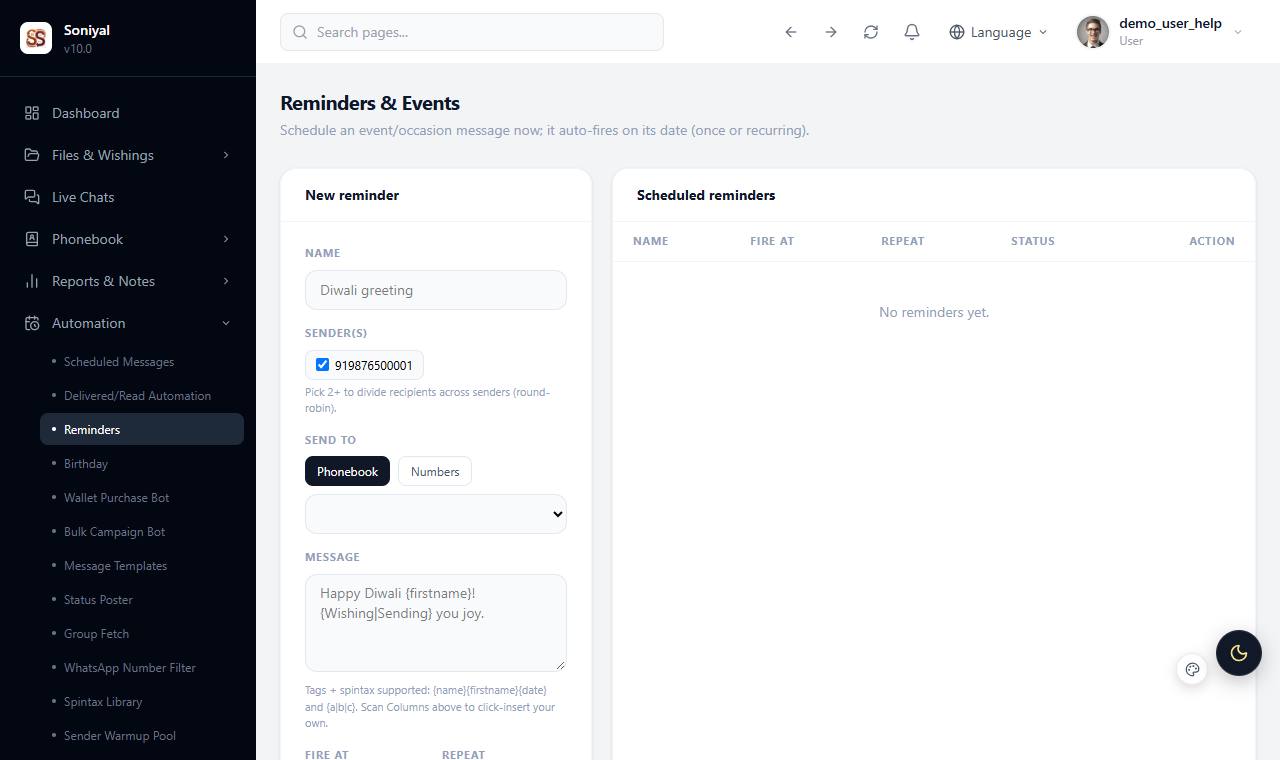
Reminders send a message on a date you set, once or repeating. Birthday messages greet contacts on their birthday so nobody is forgotten.
When to use it
Payment due dates, appointments, anniversaries and customer birthdays.
Example
A jeweller adds anniversaries of 200 customers; each gets “Happy anniversary! Enjoy 10% off today.”
Pro tips
- Send birthday wishes in the morning for the best response.
- Export reminders to Excel to share with your team.
Step by step
-
Open Reminders Go to Automation → Reminders and create a new reminder.
-
Choose the contact and date Pick who it is for and when, and whether it repeats.
-
Write the message Use tags and optional media; save it.
-
Open Birthday Go to Automation → Birthday to set the birthday greeting and the time it should go out.
-
Keep dates updated Add birthdays in the phonebook so the greeting finds them.
Frequently asked questions
Can reminders repeat yearly?
Yes, choose a repeating option.
Do reminders need the device online?
Yes, the number must be connected at send time.
Ready to try it yourself?
Create a free account and connect your first WhatsApp number in minutes.
Start free
