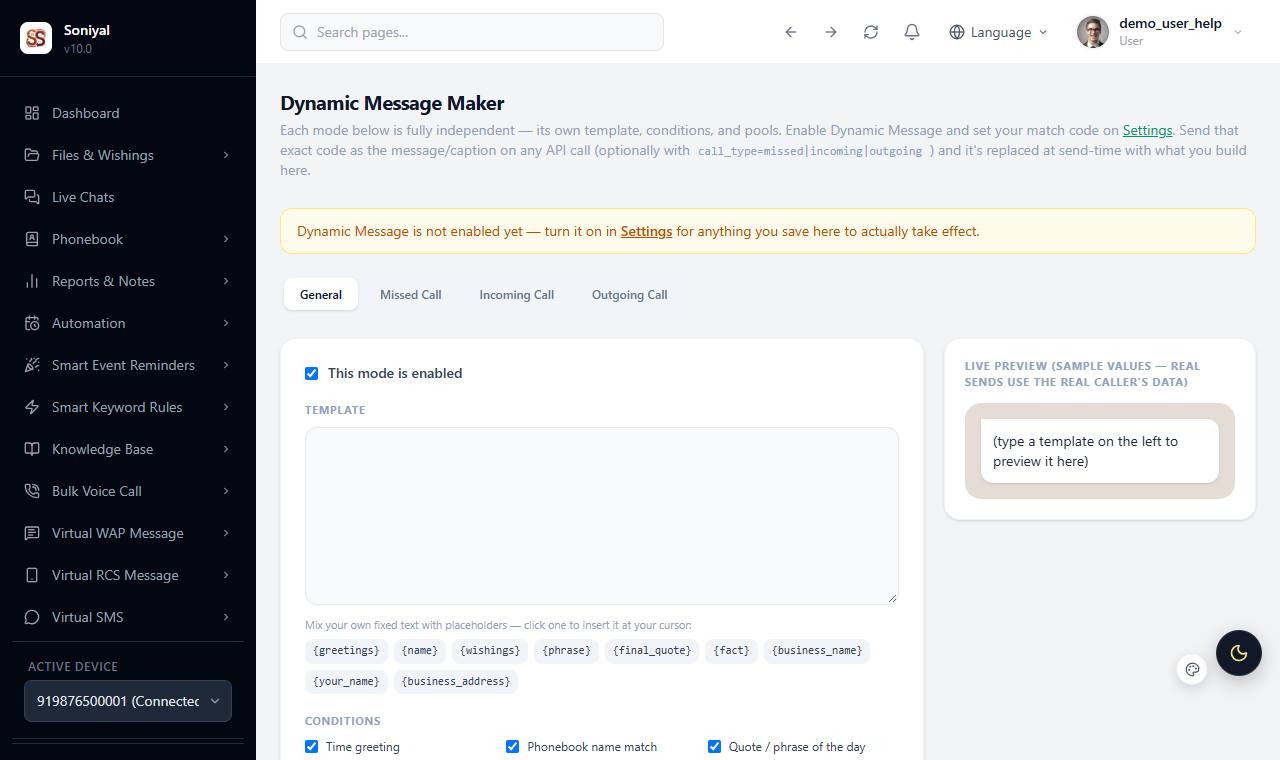
Build pools of greetings and phrases so each recipient gets a natural, unique message.
Send messages1 min readUpdated:
Sending the exact same text to hundreds of people is easy to spot. Dynamic Message lets you create pools — greetings, phrases, facts, quotes — and insert them with tags, so each message is different but still on topic.
When to use it
Large campaigns, welcome messages and auto replies where you want a human, non-robotic feel.
Example
“{greetings} {name}! {phrase} Visit {business_name} today.” becomes “Good morning Anita! Fresh stock has arrived. Visit Sharma Mart today.” for one person and a slightly different line for the next.
Pro tips
Add at least 5 options per pool.
Combine with Spintax for even more variety.
Step by step
Open Dynamic Message
Go to Automation → Dynamic Message.
Fill your business details
Add your business name, your name and address so tags like {business_name} work.
Create pools
Add several options for greetings and phrases; one is picked at random each time.
Insert the tags
In a campaign, welcome message or auto reply, click the tags such as {greetings} or {final_quote} to add them.
Test
Send yourself two test messages and see how they differ.
Frequently asked questions
Do tags work everywhere?
They work in places that show the tag buttons, such as Auto Reply and campaigns.